Port Binding Strategies

For a long time, web applications could not run on their own. PHP code had to be deployed into Apache. Java servlets were packaged into WAR files and dropped into Tomcat. The application never started a server - it was loaded into one. This meant you could not test the application without the server, could not scale it independently, and could not deploy it anywhere that did not have the exact same server setup. The 12-factor methodology introduced a cleaner approach: the application itself should bind to a port and serve requests directly. No external web server container required.
What Port Binding Means
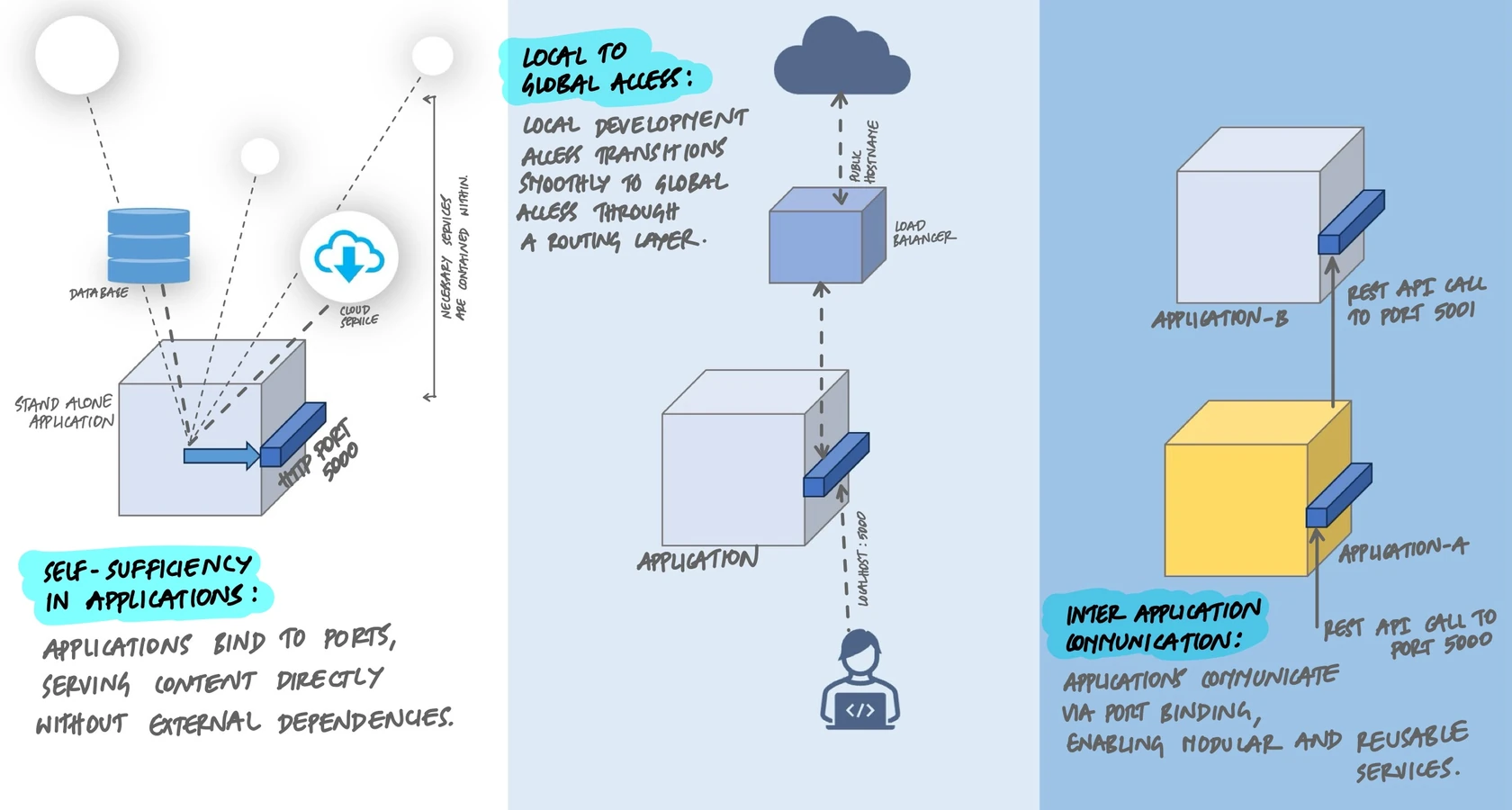
Port binding means your application starts its own HTTP server, listens on a network port, and handles incoming requests. It does not get deployed into something else. It is the server.
When you run a Flask application locally and visit http://localhost:5000, that is port binding in action. The application opened port 5000, started listening, and responded to your request. No Apache, no Nginx, no Tomcat involved.
The Old Way: Deploy Into a Server
Before port binding became the norm, the deployment model looked like this:
- PHP - Write
.phpfiles and place them inside Apache's document root. Apache handles the HTTP layer, calls PHP for each request, and returns the output. - Java - Package code into a
.warfile and deploy it into Tomcat. Tomcat manages the port, the thread pool, and the servlet lifecycle. - Python (CGI era) - Write scripts that Apache calls through
mod_cgiormod_wsgi. The application has no control over how or when it runs.
The problem is that the application cannot run without the external server. You cannot start it on your laptop without installing and configuring Apache or Tomcat first. You cannot easily change ports. You cannot scale instances independently. The application and its server are fused together, and every environment needs the same server configuration to work.
The New Way: The Application Is the Server
A 12-factor application includes an HTTP server as a library dependency. When the application starts, it binds to a port and starts handling requests immediately:
from flask import Flask

app = Flask(__name__)

@app.route("/")
def index():
    return {"status": "healthy"}

if __name__ == "__main__":
    app.run(port=5000)
That is a complete web application. No external server to install. No configuration files to edit. Run it with python app.py and it starts listening on port 5000. The web server library (Werkzeug, which Flask uses internally) is declared as a dependency in requirements.txt and ships with the application.
The same pattern applies across languages. Node.js applications use Express or Fastify. Go applications use net/http. Rust applications use Actix or Axum. In every case, the HTTP server is a library, not a separate piece of infrastructure.
Making the Port Configurable
Hardcoding a port number works for local development, but in production the platform assigns ports dynamically. Cloud services like Heroku, Google Cloud Run, and Railway set a PORT environment variable and expect your application to listen on it. This is the standard pattern:
import os
from flask import Flask

app = Flask(__name__)

@app.route("/")
def index():
    return {"status": "healthy"}

# Read port from environment, default to 5000 for local dev
port = int(os.environ.get("PORT", 5000))
app.run(host="0.0.0.0", port=port)
Two things changed. First, the port comes from the PORT environment variable with a fallback to 5000. Second, the host is set to 0.0.0.0 instead of the default 127.0.0.1. This is important - binding to 0.0.0.0 means the application accepts connections from outside the machine, which is required when running inside a container or behind a load balancer.
Development to Production with a Reverse Proxy
In local development, you access the application directly at http://localhost:5000. In production, users never see the port number. A reverse proxy or load balancer sits in front of the application, accepts requests on the public hostname (port 80 or 443), and forwards them to the application's internal port.
# Nginx reverse proxy configuration

server {
    listen 443 ssl;
    server_name api.example.com;

    location / {
        # Forward to the port-bound application
        proxy_pass http://127.0.0.1:5000;
        proxy_set_header Host $host;
        proxy_set_header X-Real-IP $remote_addr;
    }
}
The application does not know or care that Nginx is in front of it. It still binds to port 5000 and handles requests the same way it does on a developer's laptop. The routing layer is an environment concern, not an application concern.
Port Binding with Docker
Docker makes port binding explicit. The application binds to a port inside the container, and Docker maps that internal port to a port on the host machine:
# Dockerfile
FROM python:3.12-slim
WORKDIR /app
COPY requirements.txt .
RUN pip install -r requirements.txt
COPY . .

# Document which port the app uses
EXPOSE 5000

# Start the application
CMD ["gunicorn", "--bind", "0.0.0.0:5000", "app:app"]
# Run the container, mapping host port 8080 to container port 5000
docker run -p 8080:5000 myappThe application inside the container still binds to port 5000, exactly like it does in local development. The -p 8080:5000 flag maps host port 8080 to container port 5000. Users access port 8080 on the host, Docker routes it to port 5000 inside the container. The application code never changes.
With Docker Compose, multiple services each bind to their own ports, and the port mapping is declared in the compose file:
# docker-compose.yml
services:
  api:
    build: ./api
    ports:
      - "8080:5000"
    environment:
      - PORT=5000

  worker:
    build: ./worker
    ports:
      - "8081:5000"
    environment:
      - PORT=5000
Both services bind to port 5000 inside their own containers, but they are exposed on different host ports. Each service is independent and self-contained.
Production Servers: Beyond the Development Server
The Flask development server is fine for local development, but it is not built for production traffic. It handles one request at a time and has no worker management. In production, you use a production-grade WSGI server like Gunicorn that still follows the same port binding pattern:
# Development - Flask's built-in server
python app.py
# Listens on port 5000, single worker

# Production - Gunicorn with multiple workers
gunicorn --bind 0.0.0.0:5000 --workers 4 app:app
# Listens on port 5000, four workers handling requests in parallel
The application code does not change. The port is the same. The only difference is what runs the server process. Gunicorn spawns multiple worker processes, each handling requests concurrently, which is what production traffic requires.
Beyond HTTP
Port binding is not limited to HTTP. Any network protocol can be exported through a port. A few examples:
- A gRPC service binds to a port and speaks Protocol Buffers instead of HTTP.
- A WebSocket server binds to a port for real-time bidirectional communication.
- A metrics exporter binds to a separate port (like port 9090) so Prometheus can scrape application metrics without exposing them on the main HTTP port.
This also means one port-bound application can serve as a backing service for another. Your API on port 5000 can call an internal authentication service on port 5001. The authentication service URL is just another environment variable:
# .env
AUTH_SERVICE_URL=http://auth-service:5001
PAYMENT_SERVICE_URL=http://payment-service:5002
Each service is self-contained, binds to its own port, and communicates with others through their port-bound URLs. This is the foundation of microservice architecture - independent services connected through well-defined network interfaces.
Key Takeaway
A 12-factor application does not get deployed into a web server. It includes an HTTP server as a library, binds to a port, and handles requests directly. The port comes from the environment so the platform can assign it dynamically. In development, you access it at localhost:5000. In production, a reverse proxy or load balancer routes public traffic to the application's port. The application code stays the same in every environment. Port binding makes your application self-contained, portable, and ready to run anywhere a port is available.