Embracing Config Flexibility

Hardcoded database URLs, API keys committed to repositories, config files that differ between environments - these are symptoms of configuration mixed into code. When config lives in the source, changing a database connection requires a code change, a build, and a deploy. Worse, secrets end up in version control where anyone with repository access can read them. The 12-factor methodology says configuration should be stored in the environment, completely separate from code.
What Is Configuration?
Configuration is anything that changes between deploys. The code is the same in development, staging, and production. The configuration is what makes each environment different:
- Database connection strings - different databases for dev, staging, and production.
- API keys and secrets - credentials for external services like payment providers, email services, or cloud storage.
- Service URLs - the address of a backing service that differs between environments.
- Feature flags - toggles that enable or disable functionality per environment.
- Operational settings - log level, worker count, cache TTL.
What is not configuration? Internal application settings that stay the same everywhere - route definitions, middleware order, template paths. These belong in code because they do not change between deploys.
The Wrong Way: Config in Code
The most common violation is hardcoding values that should be configurable:
# Hardcoded config - never do this

DATABASE_URL = "postgresql://admin:s3cret@prod-db:5432/myapp"
STRIPE_API_KEY = "sk_live_abc123def456"
REDIS_URL = "redis://prod-cache:6379/0"
DEBUG = False
This creates several problems:
- Secrets in version control. The database password and Stripe API key are now in every clone of the repository. Anyone with read access - current employees, former employees, contractors, CI systems - can see them.
- Cannot change without a deploy. If the database moves to a new host, you need to change code, commit, build, and deploy. What should be a config change becomes a release.
- One config for all environments. Development, staging, and production need different values. With hardcoded config, you either maintain separate code branches or add environment-checking logic, both of which violate the codebase principle.
The Wrong Way: Config Files in the Repository
A slightly better but still problematic approach is using config files that are checked into version control:
# config/production.py - checked into git

DATABASE_URL = "postgresql://admin:s3cret@prod-db:5432/myapp"
STRIPE_API_KEY = "sk_live_abc123def456"
DEBUG = False

# config/development.py - checked into git

DATABASE_URL = "postgresql://dev:dev@localhost:5432/myapp_dev"
STRIPE_API_KEY = "sk_test_xyz789"
DEBUG = True
This groups config by environment name, which seems organized but has real downsides. The files multiply as environments grow - staging, QA, demo, each developer's local setup. Secrets are still in the repository. And there is no clean way to add a new environment without editing code.
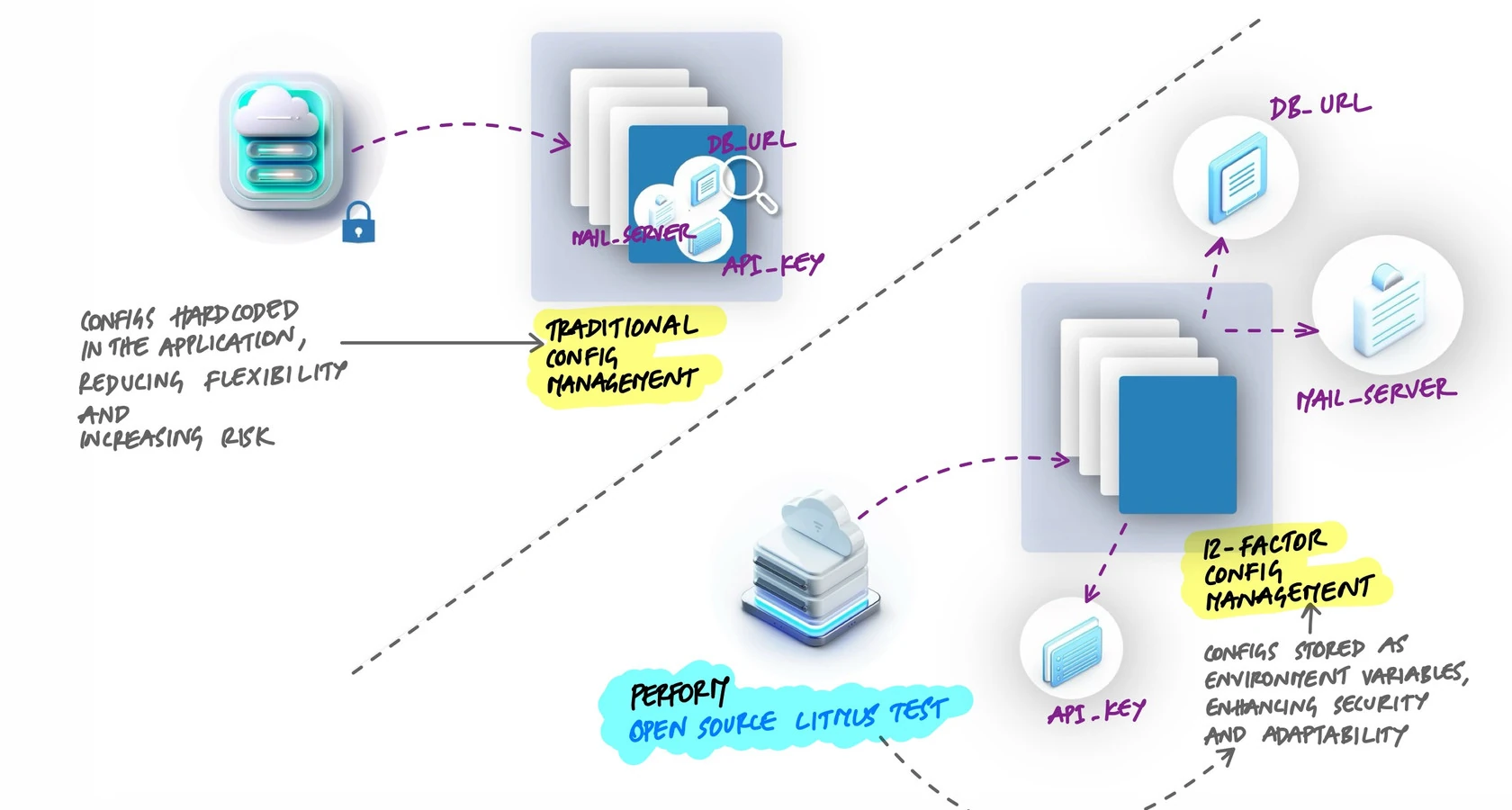
The Right Way: Environment Variables
The 12-factor approach stores config in environment variables. The application reads its configuration from the environment at runtime:
import os

# Read config from environment variables
DATABASE_URL = os.environ["DATABASE_URL"]
STRIPE_API_KEY = os.environ["STRIPE_API_KEY"]
REDIS_URL = os.environ["REDIS_URL"]
DEBUG = os.environ.get("DEBUG", "false").lower() == "true"
Now the code has zero secrets. The same code runs in every environment. The only thing that changes is which environment variables are set. Each deploy gets its own values:
# Development
DATABASE_URL=postgresql://dev:dev@localhost:5432/myapp_dev
STRIPE_API_KEY=sk_test_xyz789
DEBUG=true

# Production
DATABASE_URL=postgresql://admin:s3cret@prod-db:5432/myapp
STRIPE_API_KEY=sk_live_abc123def456
DEBUG=false
The Open Source Test
Here is a quick way to check if your config management is right:
Could you open-source your codebase right now without leaking a single credential?
If the answer is yes, config is properly separated. If the answer is "we would need to scrub a few files first," then secrets are in the code, and that is a problem waiting to happen.
Reading Config in Practice
In a real application, you want more than raw os.environ calls scattered throughout the code. A common pattern is a single config module that reads all environment variables, applies defaults for optional values, and fails early if required values are missing:
# config.py

import os

def require(name):
    value = os.environ.get(name)
    if value is None:
        raise RuntimeError(f"Missing required env var: {name}")
    return value

# Required - app will not start without these
DATABASE_URL = require("DATABASE_URL")
SECRET_KEY = require("SECRET_KEY")

# Optional - sensible defaults for development
DEBUG = os.environ.get("DEBUG", "false").lower() == "true"
LOG_LEVEL = os.environ.get("LOG_LEVEL", "info")
WORKER_COUNT = int(os.environ.get("WORKER_COUNT", "4"))
The rest of the application imports from this module. If someone deploys without setting DATABASE_URL, the app fails immediately with a clear error instead of crashing later with an obscure connection error.
# app.py

from config import DATABASE_URL, DEBUG
from flask import Flask
from sqlalchemy import create_engine

app = Flask(__name__)
app.config["DEBUG"] = DEBUG

engine = create_engine(DATABASE_URL)
Local Development with .env Files
Setting environment variables manually every time you open a terminal is tedious. For local development, .env files provide a convenient shortcut:
# .env (local development only - NOT committed to git)

DATABASE_URL=postgresql://dev:dev@localhost:5432/myapp_dev
SECRET_KEY=local-dev-secret-not-real
STRIPE_API_KEY=sk_test_xyz789
DEBUG=true
LOG_LEVEL=debug
A library like python-dotenv loads this file automatically:
# Load .env file if it exists (development only)
from dotenv import load_dotenv
load_dotenv()

# Now os.environ has the values from .env
import os
print(os.environ["DATABASE_URL"])
# postgresql://dev:dev@localhost:5432/myapp_dev
The critical rule: the .env file must be in .gitignore. It never gets committed. In production, the real environment variables are set by the platform, not by a file.
# .gitignore
.env
.env.local
.env.*.local
Config in Docker and Production
In Docker, environment variables are passed at runtime. The application code does not change - only the environment around it does:
# docker-compose.yml
services:
  api:
    build: .
    environment:
      - DATABASE_URL=postgresql://dev:dev@db:5432/myapp
      - SECRET_KEY=local-dev-secret
      - DEBUG=true
    ports:
      - "5000:5000"

  db:
    image: postgres:16
    environment:
      - POSTGRES_USER=dev
      - POSTGRES_PASSWORD=dev
      - POSTGRES_DB=myapp
In Kubernetes, secrets and config maps inject environment variables into pods:
# Kubernetes deployment (excerpt)
containers:
  - name: api
    image: myapp:v2.3.1
    env:
      - name: DATABASE_URL
        valueFrom:
          secretKeyRef:
            name: myapp-secrets
            key: database-url
      - name: LOG_LEVEL
        valueFrom:
          configMapKeyRef:
            name: myapp-config
            key: log-level
In each case, the application code is identical. The only difference is how the environment variables reach the process. Locally it is a .env file. In Docker Compose it is the environment block. In Kubernetes it is secrets and config maps. The application does not know or care which method is used.
Naming Config Variables
Keep variable names deploy-agnostic. Do not embed environment names into config keys:
# Bad - environment name baked into the variable
STAGING_DATABASE_URL=postgresql://...
PROD_DATABASE_URL=postgresql://...

# Good - same variable name, different value per deploy
DATABASE_URL=postgresql://...
Each environment variable should work independently. Changing LOG_LEVEL should not require changing anything else. This keeps config granular and avoids coupling between unrelated settings.
Key Takeaway
Configuration belongs in the environment, not in code. Hardcoded values create security risks and make the application rigid. Config files checked into version control leak secrets. Environment variables solve both problems - the code stays clean and portable, secrets stay outside the repository, and each deploy gets exactly the config it needs without any code changes. Use a config module to centralize reads, fail early on missing values, and keep variable names deploy-agnostic. The goal is simple: one codebase that works everywhere, configured entirely from the outside.