Tandem: An Open-Source Software KVM for macOS
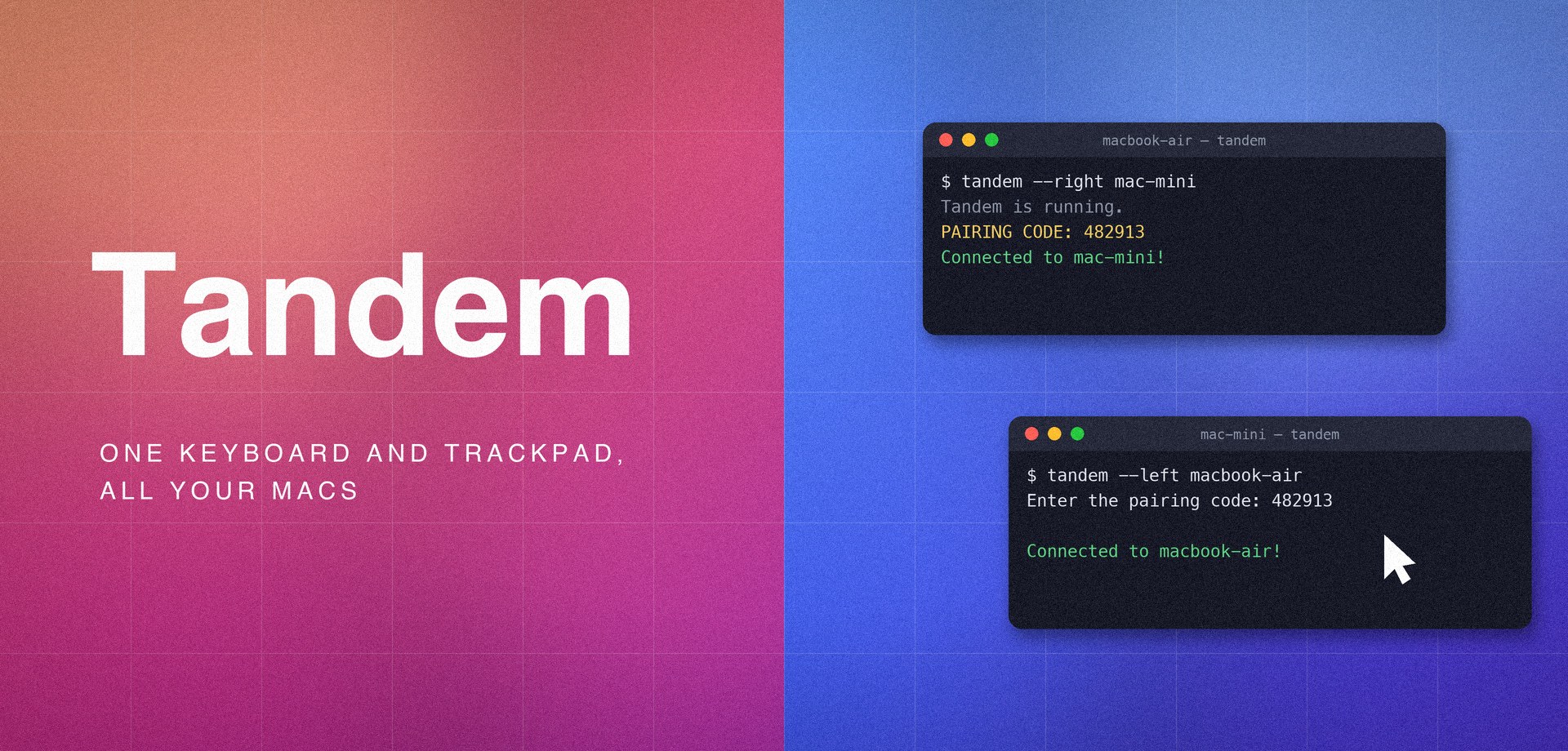
Tandem is an open-source software KVM for macOS that I built and recently published. Run it on two Macs sitting side by side, pair them once with a 6-digit code, and push your cursor off the edge of one screen to control the other - clipboard included. Here is why I built it, and how it works.
Why Another KVM
A software KVM (keyboard, video, mouse) lets one keyboard and trackpad control several computers over the network, as if they were one machine. macOS ships this built in as Universal Control, and when it works, it is great.
The problem is that it kept failing me. Devices stop seeing each other after sleep. Reconnection is hit-or-miss. And when it silently fails, there is nothing to inspect and nothing to restart - no logs, no status, no command that tells you what is wrong. You toggle settings, wave the cursor at the screen edge, and eventually reboot something. For a tool I depend on for day-to-day work, that was not good enough.
So I finally decided to build an open-source alternative: a KVM built around dependability. Explicit pairing instead of ambient magic. Automatic reconnection after sleep and network blips. A tandem doctor command that diagnoses permissions and environment. And logs you can actually read when something goes wrong.
What Tandem Is
Tandem is a Python CLI. On both Macs:
pipx install tandem-kvm   # or: pip install tandem-kvm
tandem doctor             # verify permissions & environment
Then, with the second Mac to the right of the first:
# Mac on the left:
tandem --direction right

# Mac on the right:
tandem --direction left
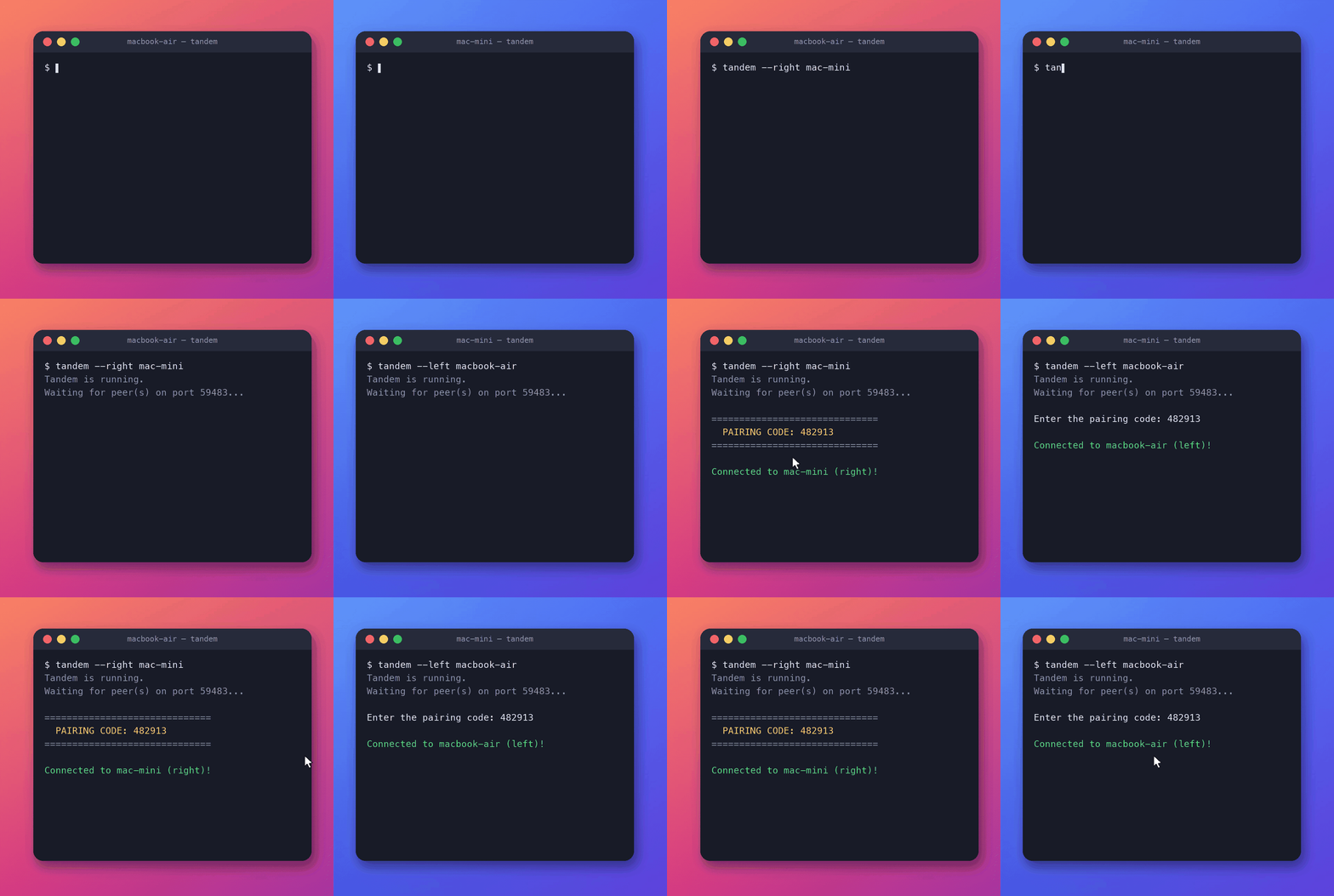
A 6-digit pairing code appears on one screen; you type it on the other. From then on the machines find each other, authenticate, and reconnect on their own. Slide the cursor off the edge and it appears on the other Mac:
Three or more Macs work too - each machine names its neighbors and they form a chain the cursor walks across:
tandem --right mac-2               # Mac-1, leftmost
tandem --left mac-1 --right mac-3   # Mac-2, middle
tandem --left mac-2                 # Mac-3, rightmost
How It Works
Every machine runs the identical program - there is no server and no client. Machines discover each other on the local network, prove they are your Macs with the one-time pairing code, and stream input to each other over encrypted TCP connections. The rest of this post walks through the mechanisms that make that dependable.
Five modes, one at a time
Every machine is always in exactly one of five modes: LOCAL (input is yours), CONTROLLING (your input is captured and forwarded to a neighbor, your cursor parked and hidden), CONTROLLED (a neighbor's input is injected here), RELAYING (the cursor has walked across this machine onto the next one; input passes straight through), and DISCONNECTED.
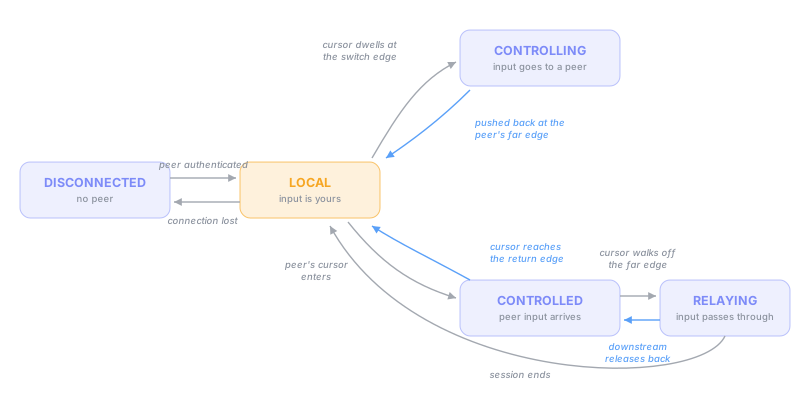
Why a strict state machine? Because control messages travel over a network, they can arrive late, duplicated, or out of order. Each machine validates every requested mode change against its current mode and discards invalid ones - which makes inconsistent states unreachable. Both machines can never end up in CONTROLLED at the same time, each waiting for input from the other.
The safety-critical side effects - releasing held keys, restoring the hidden cursor - are attached to the mode transitions, not to individual network messages. That way they run on every path out of a mode, including disconnects and crashes. A dropped connection can never leave a key held down on the other machine.
Switching only at the outer edge
The classic multi-monitor bug in tools like this: you move the cursor from your laptop screen to your external monitor and suddenly you are typing on the other computer. Tandem avoids it by only switching at the outer boundary of your whole display arrangement. A seam between two of your own monitors never switches - including L-shaped and stacked arrangements.
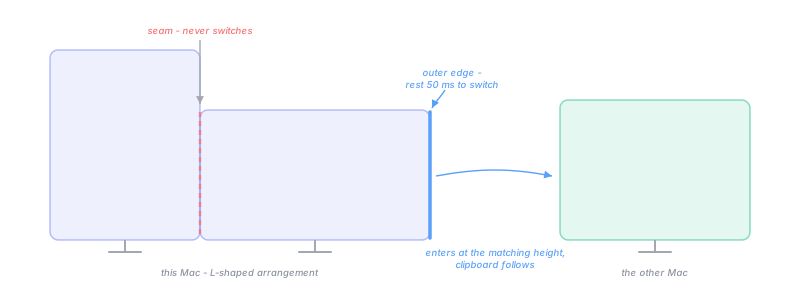
Two more details make switching feel deliberate rather than jumpy. The cursor must rest at the edge briefly (50 ms, continuously observed) - grazing the edge in passing does nothing. And when the switch happens, the cursor enters the other machine at the matching height it left from; if that spot falls in a gap of the monitor arrangement where there is no screen, it is nudged onto the nearest real display, so the cursor never disappears. Movement crosses the wire as relative deltas rather than absolute positions, so different resolutions and layouts compose naturally.
Chains: three or more Macs
With three or more Macs, each machine knows only its immediate neighbors - there is no coordinator. When the remote cursor reaches a controlled machine's far edge, that machine requests control of its own next neighbor, hands the cursor over, and drops into RELAYING - forwarding the controller's input verbatim. The controller never needs to know how long the chain is.
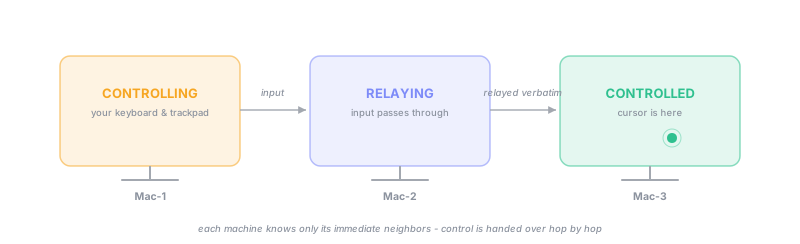
Failure handling favors the person at the keyboard. If a middle machine disappears, the rest are told the session is over, each returns to controlling itself, and any keys held down remotely are released. If the end machine disappears, the cursor falls back onto the relay's screen and the session continues. The clipboard travels the chain hop by hop, and each machine remembers a fingerprint (hash) of the last content it saw - so the same copy never bounces between machines forever.
Finding each other - and staying found
This is the part that fixes my original complaint. Machines announce themselves on the local network over Bonjour (mDNS, Apple's zero-configuration discovery protocol), tagged with an id unique to that run - so even two machines with the same hostname are told apart. No IPs to configure, no server to run. If your network blocks mDNS, --connect host dials the peer directly instead.
Because both sides discover each other at the same time, both could connect at once and each reject the other's attempt - a race called connection glare. The tiebreak is deterministic: the smaller instance id initiates, the other waits. The same tiebreak resolves the race when both cursors hit their edges in the same instant, so a pair can never end up mutually controlled.
And the important one: reconnection is automatic. After sleep, a network blip, or a restart, a backoff loop retries the last known peer while fresh mDNS announcements race it - whichever succeeds first wins. No user action, no toggling settings, no reboot.
Pairing and encryption
Trust is established once, with a 6-digit code shown on one screen and typed on the other. The code never crosses the network - so a machine you can't see can never complete a pairing.
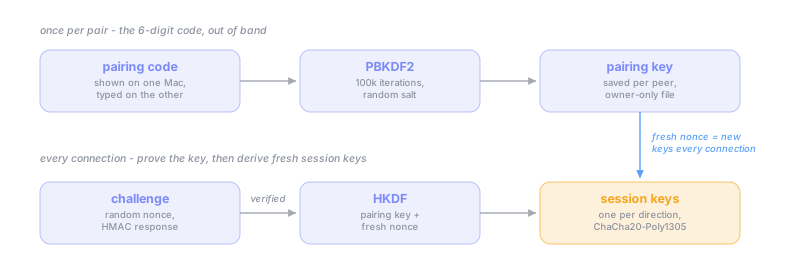
Every connection after that authenticates automatically: the peer proves it still holds the pairing key through an HMAC challenge-response (a cryptographic proof of knowing a secret without sending it) with a fresh nonce, verified in constant time. Both sides then derive fresh session keys - one per direction - and everything that follows is encrypted and authenticated with ChaCha20-Poly1305, a modern authenticated cipher.
Stale pairings heal themselves. If one machine was reinstalled, it answers “I don't know you”, the stale side discards its saved entry, and a fresh pairing code appears on the same connection - no manual cleanup on either machine.
On the wire
The protocol is length-prefixed binary frames over TCP (with TCP_NODELAY for latency). Plaintext exists only during the handshake; the moment authentication succeeds, framing switches to the sealed, encrypted form and never goes back.
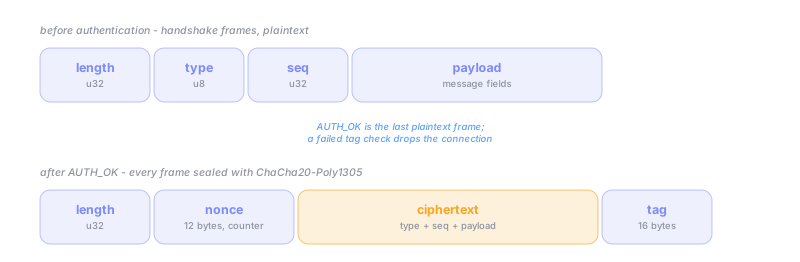
A frame that fails its authentication check drops the connection immediately - the channel never limps along after tampering. And the very first message carries the protocol version and the sender's direction, so an incompatible version - or two machines pointing the same way - is reported clearly at connect time instead of failing strangely later.
No stuck keys, no lost scrolls
The rule Tandem holds itself to: no failure may ever leave stuck keys or a hidden cursor behind. A few of the details in service of that:
- Keepalive that costs nothing during use. A ping is sent only after 2 seconds of complete silence - forwarded input already proves the connection is alive. Six seconds of no traffic tears the connection down.
- Force-release on every exit. The controlled side tracks every held button, key, and modifier, and releases them on disconnect or shutdown.
- Drags never tear. Switching is suppressed while a mouse button is down, so a file drop cannot be ripped across machines mid-flight.
- Clipboard without re-sends. Content is read, hashed, and sent only when it genuinely changed - switching back and forth never re-transfers a 10 MB screenshot. Text and images sync; transfers cap at 10 MB.
- Slow scrolling still works. A trackpad scrolled gently sends movements smaller than one pixel (like 0.3 at a time). Instead of rounding each one down to zero, Tandem adds the fractions up and scrolls once they reach a whole pixel.
Security Limitations
The 6-digit code is low-entropy: it is used once and never sent over the network, but an attacker who records the very first pairing handshake could brute-force it offline (key stretching slows this down) - so pair on a network you trust. There is no forward secrecy: someone who steals the saved pairing file can decrypt recorded past sessions of that pairing; tandem unpair and re-pairing rotates the secret. And a malicious device on your network can trigger a pairing prompt by advertising your peer's hostname, but cannot complete it without the code from your screen - never type a code that isn't displayed on your own Mac.
Try It
Tandem is beta software, macOS-only, and needs Python 3.11+ and the Accessibility permission for your terminal:
pipx install tandem-kvm
tandem doctor
tandem --direction right   # and --direction left on the other Mac
The code, usage guide, and full architecture doc are on GitHub, and the package is tandem-kvm on PyPI. If Universal Control has ever silently abandoned you mid-workday, give it a try - and if something breaks, tandem doctor and the logs will actually tell you why.